Turn a prompt or a photo into an animated GIF, free to tryMake a GIF

Your photo

For the best result
  • One clear photo of a person, pet or object (JPG, PNG or WebP, up to 10 MB)
  • The subject should fill most of the frame

Locket

0/300
Aspect ratio

Heart Locket GIF Maker

Upload one photo and get a looping GIF of a heart locket opening onto it. Your first GIF is free, no sign-up, no watermark.
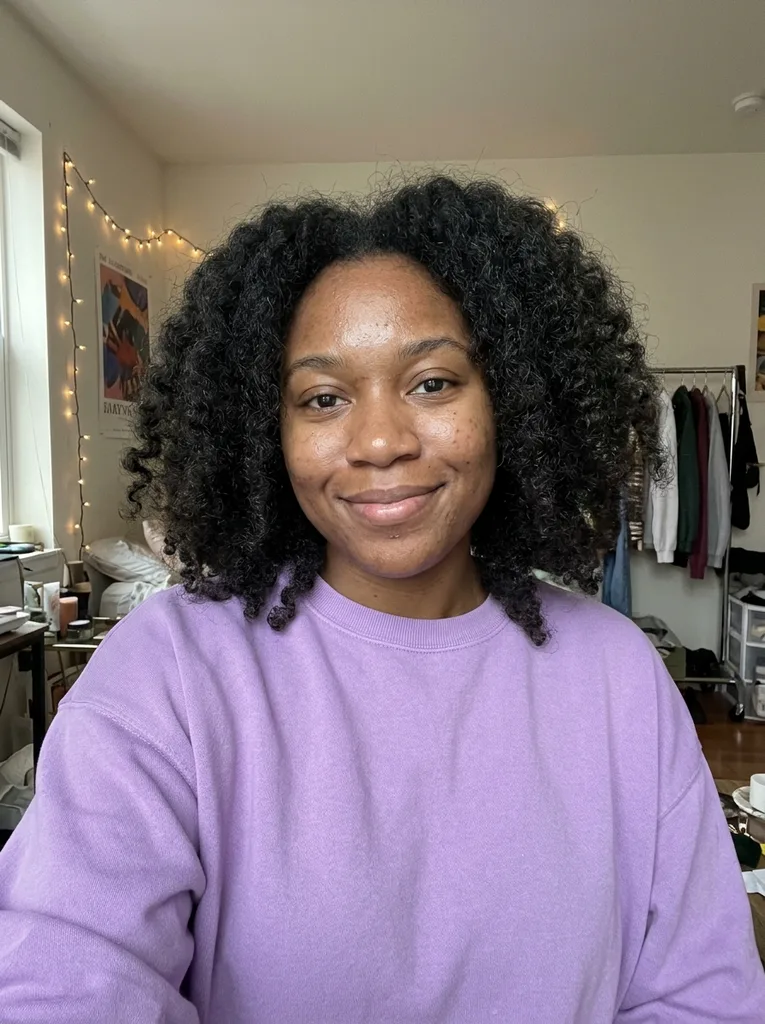
Original: Woman in her mid 20s with curly hair: GoldBefore
Heart Locket GIF Maker result: Woman in her mid 20s with curly hair: GoldAfter

Example result. Upload your photo to make yours.

Examples

Original: Woman in her mid 20s with curly hair: GoldBefore
Heart Locket GIF Maker result: Woman in her mid 20s with curly hair: GoldAfter
Heart Locket GIF Maker result

A heart locket that opens onto your photo

With this heart locket GIF maker, one photo in gives one looping GIF out.

This heart locket GIF maker draws a heart-shaped locket on a fine chain and opens it slowly to show your photo fitted inside the heart. You upload the photo, choose a metal, and the GIF is made for you in under a minute.

It needs only one photo. A person, a pet or an object all work as the picture in the locket, and there is no second side to fill. Many locket makers ask for two photos or a line of text; here the single photo is the whole gift.

The result is a small looping GIF with no watermark. It suits an anniversary note, a Valentine message, a birthday wish or a keepsake for a parent, and you can send it in any chat that accepts GIF files.

Made for

  • Couples
  • Anniversary notes
  • Gifts for a parent
  • Pet owners
  • Friends
  • Valentine messages

How to use the heart locket GIF maker

  1. 1

    Upload one photo

    Click the upload area or drag a JPG, PNG or WebP file in, up to 10 MB. Choose a photo of one person, pet or object with the subject filling most of the frame.

  2. 2

    Pick Gold, Silver or Rose gold

    Gold is preselected. Silver is a cooler metal, and Rose gold adds a few tiny pink hearts around the locket. Choose square, wide or tall, and add a note such as slower motion if you like.

  3. 3

    Generate and download

    Press Generate GIF. It usually takes about 20 to 30 seconds. The GIF plays in the page, and Download saves it as a .gif file you can send right away.

Photo tips for a clearer heart GIF

The photo sits inside a small heart, so framing matters.

  • Pick a close-up where the face fills most of the frame, because the photo sits inside a small heart.
  • Use one clear subject: one person, one pet or one object.
  • Choose a sharp, well-lit photo; a blurry one stays blurry inside the heart.
  • Keep the face uncovered, without sunglasses or a hand across it.
  • Use a plain background when you can, so the subject stands out against the metal.
  • Pick the aspect ratio for where the GIF goes: square for chats, tall for stories, wide for a banner.
  • Use the note box for small asks like sparkles or slower motion, up to 300 characters.
  • Compare the GIF with your original photo before you send it, since it is AI output.
  • Skip photos with several faces; the heart is small, and a crowd turns into a blur.

Frequently asked questions

Your first GIF is free: one free GIF, with no sign-up and no email. After that the tool tells you the free tries are used. Nothing here asks for a card.

No. The GIF you download has no watermark added to it, even the free one. What you see in the result area is the file you save.

No. This tool takes one photo, and the locket opens onto it. There are no text fields for names or dates, so a message has to go in a separate caption or chat text. If you need two photos or typed words inside the locket, a template-based heart GIF maker fits better.

Yes. A clear photo of a pet works as well as a person, and so does an object such as a favorite mug or a toy. Fill most of the frame with the subject so it stays easy to see inside the heart.

Gold, Silver and Rose gold. All three open the same way and only the metal changes. Rose gold also adds a few tiny pink hearts around the locket. Gold is the default. Silver is the cooler, plainer look; Gold is the warmer one.

It usually takes about 20 to 30 seconds. The GIF loops forever, with 9 frames at 200 ms each, about a 1.8-second loop. A square GIF is 512 by 512 pixels, and a 16:9 one is 1024 by 576.

It aims to keep the person or pet recognizable, but it is AI output, so compare the GIF with your original before you send it. A close, sharp face with even light gives the best chance. Before generating your heart locket GIF, choose a close, sharp photo and add any instructions in the note.

Your prompt and photo are only used to create your GIF and are never used to train AI models.

Download the .gif file and attach it in a chat or post it. There is no share button for a specific app, but most chat and social sites accept GIF uploads. A square GIF is the safest shape for a message thread.

No. This page makes one effect: a heart locket opening onto your photo. You can change the metal, the aspect ratio and add a short note, but there is no frame, speed or duration setting.